

I see a few readers are having some difficulty finding the link to their tweets on Twitter. I thought I would give a simple basic example on how to find the link.
After you have posted your tweet you should see something similar to this picture…
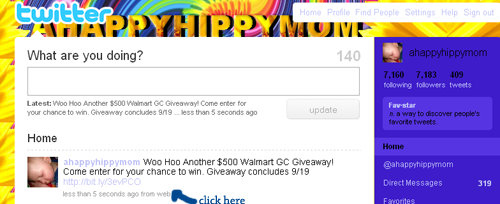
You see where it says “less than 5 seconds ago from web?” Click on that link. It should bring you to a page like this one below…

Up above in the address bar you will see the link to your tweet. Copy the link and post it in your comment.
If you are still having trouble please feel free to contact me and I will try to help you.
Please follow and like us:
















you are sooo awesome! I never knew how to do this- and would skip over the twitter entries to contests because I couldnt figure it out!! Thanks!!
Yeah! Thank you for sharing your knowledge. Here is the link to my tweet
http://twitter.com/teensizer/status/4044377197
Thank you. I didn’t see this until after I told you I didn’t know how to link!!! WOO-HOO!!!
Ha I’m guessing you know how many times I’ve been asked that question…very good post!
thank you for this useful info
I hope I am doing this right i am trying anyway =)
Ha- I didn’t realize I even had to do that! THANKS!
Hi, I tried to email you yesterday. Please read the new version of earnextremeprofits.blogspot.com/2009/11/one-shot-for-high-paying-adsense-ads.html One Shot for High Paying AdSense ads. It’s free so grab your copy today.
i really like your writing style